What We'll Cover
Introduction
Even experienced data analysts make SQL mistakes. Some errors cause wrong results, while others can crash your database or slow down performance dramatically. In this guide, we'll walk through the 10 most common SQL mistakes and show you exactly how to avoid them.
Why This Matters
A single SQL mistake in production can lead to incorrect reports, data corruption, or hours of debugging. Learning to recognize these patterns will save you time and protect your data integrity.
Using SELECT * in Production
The Mistake
Using SELECT * to fetch all columns from a table might seem convenient, but it's a
performance killer and maintenance nightmare.
Why It's Bad
- Performance: Transfers unnecessary data over the network
- Maintenance: If table structure changes, your code may break
- Clarity: Other developers don't know which columns you actually need
The Fix
Best Practice
Always explicitly list the columns you need. The only exception is during quick exploratory analysis in development.
Forgetting NULL Handling
The Mistake
NULL values in SQL behave differently than you might expect. Comparing anything to NULL returns NULL (unknown), not TRUE or FALSE.
Why It's Bad
You might miss important data or get incorrect aggregations. NULL means "unknown" - it's not zero, empty string, or false.
The Fix
Watch Out!
Aggregation functions like SUM(), AVG(), COUNT() ignore NULL values. COUNT(*) counts all rows, but COUNT(column_name) only counts non-NULL values.
Not Using Aliases Properly
The Mistake
Writing queries without table aliases makes code hard to read and maintain, especially with JOINs.
The Fix
Alias Tips
- Use meaningful abbreviations (c for customers, o for orders)
- Be consistent across your queries
- Always alias calculated columns with AS
Incorrect JOIN Usage
The Mistake
Using the wrong JOIN type or not understanding how JOINs work leads to missing or duplicate data.
Understanding JOINs
| JOIN Type | Returns | Use When |
|---|---|---|
| INNER JOIN | Only matching rows from both tables | You need records that exist in both tables |
| LEFT JOIN | All rows from left + matching from right | You need all records from the main table |
| RIGHT JOIN | All rows from right + matching from left | Rarely used; use LEFT JOIN instead |
| FULL OUTER JOIN | All rows from both tables | You need to see unmatched records from both sides |
The Fix
Missing WHERE in UPDATE/DELETE
The Mistake
This is the most dangerous SQL mistake. Forgetting the WHERE clause in UPDATE or DELETE affects ALL rows in the table.
This Can End Careers!
Running an UPDATE or DELETE without WHERE in production has caused data loss incidents at major companies. Always double-check before executing.
The Fix: Safety Checklist
Not Using Indexes
The Mistake
Querying large tables without proper indexes makes queries run slowly - sometimes taking minutes instead of milliseconds.
The Fix
When to Create Indexes
- Columns used in WHERE clauses frequently
- Columns used in JOIN conditions
- Columns used in ORDER BY
- Foreign key columns
String vs Number Comparison
The Mistake
Comparing strings that contain numbers doesn't work as expected because strings are sorted alphabetically.
The Fix
Best Practice
Always use the correct data types when designing tables. Numbers should be INT/BIGINT, not VARCHAR.
GROUP BY Mistakes
The Mistake
Including non-aggregated columns in SELECT that aren't in GROUP BY, or using WHERE instead of HAVING for aggregates.
The Fix
| WHERE | HAVING |
|---|---|
| Filters rows BEFORE grouping | Filters groups AFTER grouping |
| Cannot use aggregate functions | Used with aggregate functions |
| WHERE status = 'active' | HAVING COUNT(*) > 5 |
Subquery Performance Issues
The Mistake
Using correlated subqueries that run once for each row in the outer query, causing severe performance issues.
The Fix
Not Testing on Sample Data
The Mistake
Running untested queries directly on production data without verifying the logic first.
The Fix: Safe Testing Workflow
Pro Tips
- Create a development/staging database with sample data
- Use EXPLAIN to understand query execution plans
- Always backup before running bulk UPDATE/DELETE
- Have a peer review queries before production runs
Quick Reference Checklist
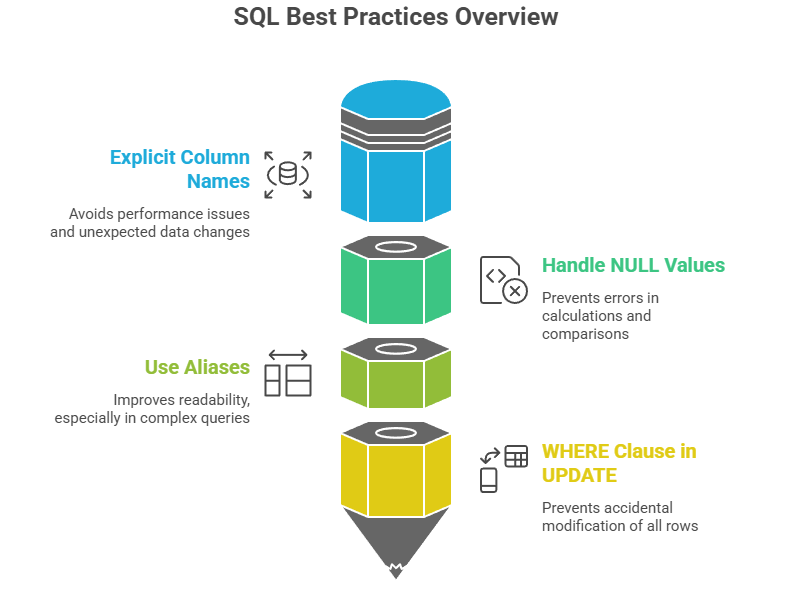
- Avoid SELECT * - list specific columns
- Handle NULLs explicitly with IS NULL, COALESCE
- Use meaningful table aliases
- Choose the right JOIN type
- ALWAYS use WHERE with UPDATE/DELETE
- Create indexes for frequently queried columns
- Use correct data types
- Use HAVING (not WHERE) for aggregate filters
- Prefer JOINs over correlated subqueries
- Test queries before running on production